How a Slow Website Can Cost Small Businesses Customers
Learn how to test and improve your website's speed to get more business.

I’m sure you can imagine that a slow website isn’t fun to use, but how much does it really affect your business?
Slow websites measurably hurt you in three ways:
- Potential customers give up on your site quickly without giving you a chance
- The ones that stay become frustrated and less likely to buy
- When users bounce from your site early, Google is less likely to show you higher in search results
By improving your website speed you’ll get a chance with more of the customers that enter your site, they’ll be more likely to buy, and your site will start to climb in search results.
In this post I’ll break down how each of those happen, along with how you can test and improve your website speed.
The stats show that slow websites cost you customers
These statistics come from years of surveys and testing from sources including Google themselves:
- 53% of visits are abandoned if a page takes longer than 3 seconds to load. [1]
- A 1 second delay can drop conversions by 7%. [2]
- Pages that load in 1 second have 2.5 to 3.5x higher conversion rates than pages that take 5 seconds to load. [3]
The big idea
Fast websites retain more users, which has two effects.
The first is obvious; more people actually read your website (and hopefully become customers).
The second has to do with something called the bounce rate. That’s when people leave your site in the first few seconds. Google thinks a higher bounce rate means your site isn’t relevant to the search, so it gets shown less.
Slow sites naturally have higher bounce rates because more users leave early. The inverse is true of fast websites; they signal to Google that your site was useful, which gives it the confidence to show you higher in search results.
How you can test your website speed
You can see how your site measures up with an industry standard tool called PageSpeed Insights. (it’s free and made by Google).
Just paste your website URL into the tool and click the button. Switch to the mobile tab when it loads (because most users experience your site on their phones). Your site will be ranked on four metrics:
- Performance: How quickly your site loads (we’re looking at this one)
- Accessibility: How usable your website is for people with disabilities
- Best Practices: How well your website code adheres to common guidelines
- SEO: How well your website code plays with Google’s search engine
Today let’s ignore everything except performance.
A healthy, realistic target is a mobile performance score of 90 or higher. There’s not much reason to try for a perfect 100 — most sites won’t meet that without tradeoffs that aren’t worth the effort.
Even if you’re not there now, there are lots of things you can do to start boosting your load speed without paying a dime.
How to make your small business website load faster
If your website is slow, don’t worry! There are things you can do to fix it.
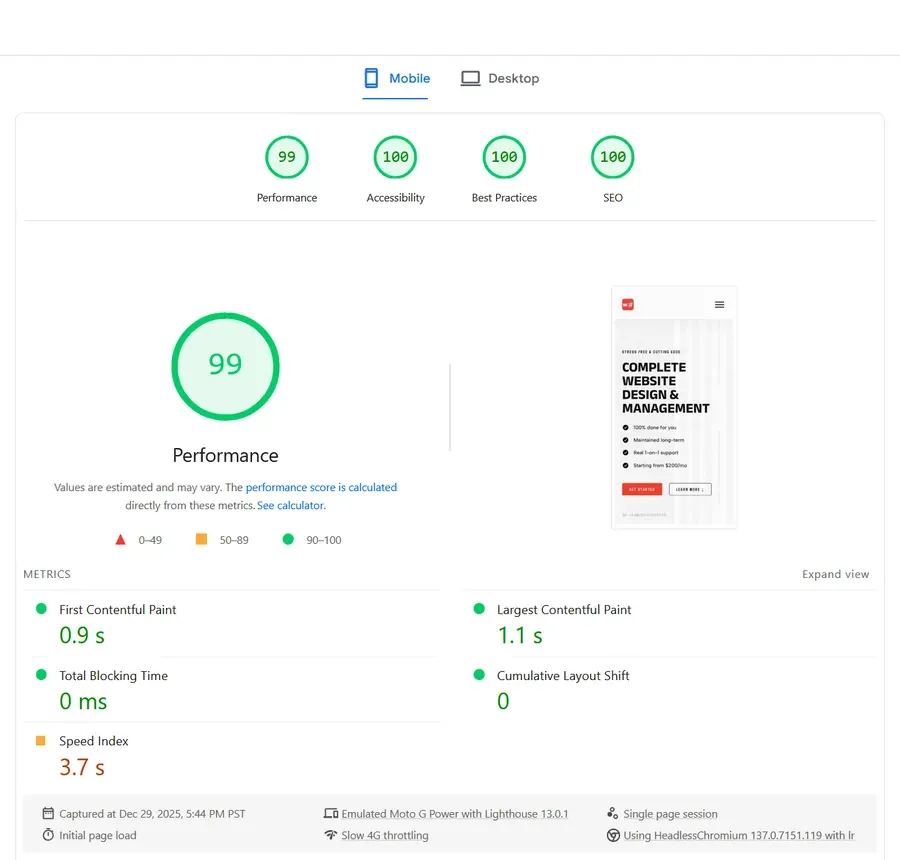 The mobile scores for my website’s home page.
I custom-make websites that consistently score close to 100 on performance and load in less than one second — here’s what actually matters for speed.
The main thing that slows a website down is having big files — usually fonts, images, and JavaScript.
Fonts
You might be surprised to hear that fonts can slow down your website, but it’s true! You can save space here in a few ways:
- Convert to a web-friendly format (woff or woff2).
- Subset your font (removes unneeded characters and thicknesses).
- User fewer fonts in the first place.
- Pre-load important fonts (so the browser doesn’t need to wait on them).
Doing any of those things (but preferably all) will help speed up your page.
Images
Images often make up the largest part of a website’s total size, here’s how you can stop them from slowing your site down:
- Compress images (you can find online tools for this).
- Convert to a web-friendly image format (webp or avif).
- Set important properties in the HTML (
decoding="async"andloading="lazy")
A little bonus is to use a picture element instead of an img to make a set of options with different formats and resolutions — the browser automatically chooses what’s best for each user. No-code tools don’t typically have an easy way to do this, but it’s my secret weapon when I custom code websites to keep images loading really fast and looking great on all screen sizes.
If you’re curious, you can learn more about why custom coded websites are awesome in another blog post I wrote.
JavaScript
JavaScript (JS) is one of the coding languages used on most websites. It can quickly get out of hand and bog your website down, especially when you start adding in third-party plugins for random bells and whistles.
Avoiding plugins you don’t need can sometimes speed your site up noticeably.
Websites made with no-code tools will struggle to compete with a good custom site because they’re designed for convenience, not speed. That’s something you can’t really get around, but it can be an acceptable trade-off for the convenience, especially for younger businesses and proof-of-concept ventures.
Conclusion
A faster website can have big benefits for your business. More visitors stay on the page, and the ones that do so are happier, which can multiply the number of customers you get each month.
Speed isn’t the only thing that brings in more customers. You also need to make sure that your site is intuitive to use, what you do for people is clear, and that you show that real people use and love your business.
If you’d like a free, no pressure audit to see what you can do to get more customers from your website, email me at wlord.webdesigns@gmail.com and ask me about it!
References
1 . Google Ad Manager. The Need for Mobile Speed: How Mobile Latency Impacts Publisher Revenue. https://blog.google/products/admanager/the-need-for-mobile-speed/
2 . Reboot Online. Website Speed Statistics: How Page Load Time Affects Conversions. https://www.rebootonline.com/website-statistics/
3 . Blogging Wizard. Page Load Time Statistics: How Speed Impacts Conversions and SEO. https://bloggingwizard.com/page-load-time-statistics/
4 . Tune The Web. What Do Lighthouse Scores Look Like Across the Web? https://www.tunetheweb.com/blog/what-do-lighthouse-scores-look-like-across-the-web/
Suggested Blogs
Learn how to make your website work for your business with these blog posts.

Breaking down what custom websites are, and all the ways they help small businesses.
What kind of website is going to help small businesses grow more in the long run, hand coded websites, or a WordPress system?

Everything you need to know about how AI content can prevent your website from bringing in customers.