How slow websites lose you business
More than half of visitors leave when a site takes over 3 seconds to load. Learn how you can test and improve your site to get more customers.

Decades of research have shown that websites that load faster make more money. Slower websites lose you potential calls, bookings, and purchases when users get impatient and move on - here are the stats to prove it.
Slow websites upset users
53% of visits are abandoned if a page takes longer than 3 seconds to load. [1] That means more than half of people give up and try the next website instead (probably your competitor’s).
Half of people expect a page to load in less than 2 seconds. [1]
46% of people say that they hate waiting for pages to load more than anything else they do when browsing the web. [1]
A 1 second delay can drop conversions by 7%. That means that even the customers who stay on your site are less likely to buy when your site is slow. [2]
Fast websites make more money
Pages that load in 1 second have 2.5 to 3.5x higher conversion rates than pages that take 5 seconds to load. [3] How would your business be different if you tripled the number of customers you currently get from your website?
How to test your website speed
The industry standard tool for testing website speed is Google’s PageSpeed Insights (formerly known as Lighthouse).
Paste your website URL (it’s free and made by Google) and switch to the ‘mobile’ tab once the report loads. It ranks your website on four metrics across mobile and desktop:
- Performance: How quickly your site loads (we’re looking at this one)
- Accessibility: How usable your website is for people with disabilities
- Best Practices: How well your website code adheres to common guidelines
- SEO: How well your website code plays with Google
The goal shouldn’t necessarily be to get a perfect score, but it is a good indicator of how you’re doing on some of the factors that Google does consider when ranking your website.
In most cases, you can easily get scores for accessibility, best practices, and SEO to all reach 100/100 - if you’re not quite there, the tool tells you exactly how to achieve those to make it as easy as possible.
For page speed, a healthy goal to strive for is a 90+ Performance score on mobile. This strikes a practical balance between fast load times, and feasibility.
A perfect 100 Performance score is not necessary for most websites, but that doesn’t mean there’s no reason to make your page faster. If your Performance score shows as yellow or red, you would probably benefit from improving your site’s load time.
How fast is the average website?
According to this technical article, the average website scores are:
- Performance: 31
- Accessibility: 80
- Best Practices: 71
- SEO: 86
An average Performance score of 31 means there’s a lot of room for improvement for most sites. I really want to stress again that you should be checking the mobile score, because most people browse the internet on their phones.
The desktop score is always going to be higher than the mobile score, and it will mislead you into thinking the average user experience is better than it really is.
Like I mentioned before, most websites should be able to achieve perfect 100s for Accessibility, Best Practices, and SEO, without much work. If you’re not there now, the tool tells you exactly what to improve for those categories to get there.
Performance is a much harder category to improve, but it’s the most important one because making your site faster directly helps you get more customers.
The good news is that improving your website’s load time will set you ahead of most businesses.
In contrast to the average, the top 1% of websites score:
- Performance: 99
- Accessibility: 100
- Best Practices: 93
- SEO: 100
A website with a Performance score of 99 will load in less than a second, which means your site loads well before visitors get bored or frustrated. Really anything over 90 should be great for your business, and it will put you ahead of most competitors.
How to improve your website speed
If your website is slow, don’t worry! There are things you can do to fix it.
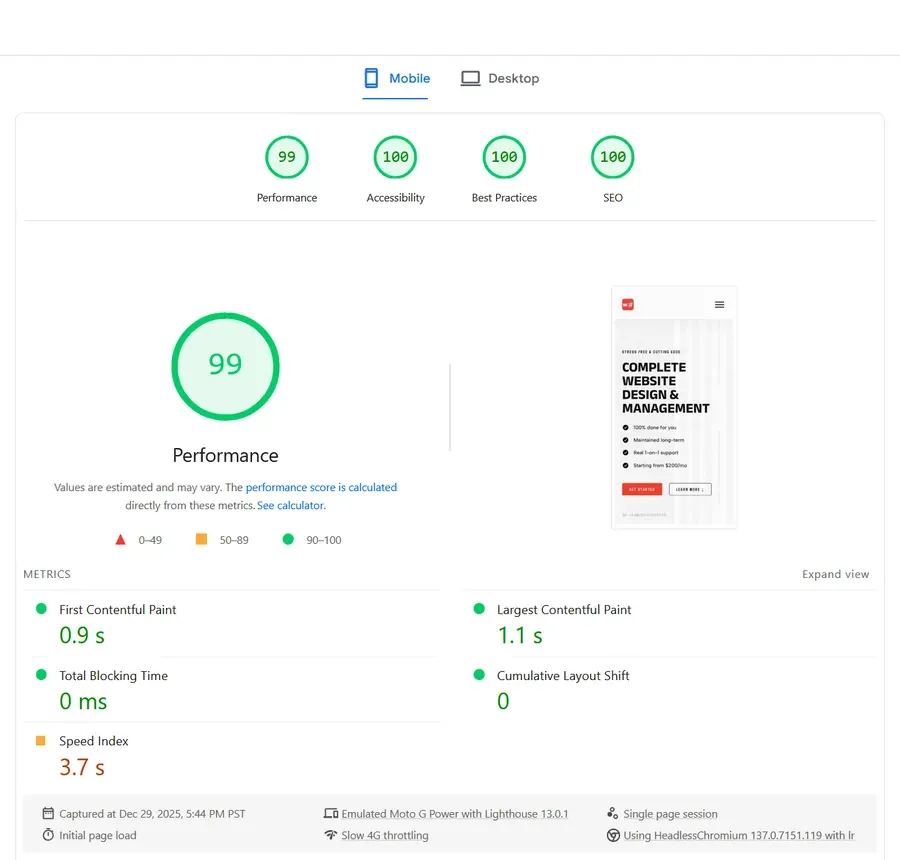 The mobile scores for my website’s home page.
Let me explain how I get clients performance scores near 100 on mobile and load times under one second.
The main thing that slows a website down is having big files - usually fonts, images, and JavaScript.
Fonts
Reduce the file size of your fonts by converting them to woff or woff2.
Remove the characters you don’t use (typically non-latin alphabets and some font thicknesses) by subsetting your fonts. A properly subset font can be 1/5 the size of the original or even smaller.
The fewer fonts you use the better; most designs look best with a small handful of well chosen fonts anyways.
Finally, pre-load font files that are used right away so the browser can grab them more quickly.
Images
Images usually make up the largest part of a website’s total file size, but it can be pretty impractical to optimize them without a specialty tool.
Compress your images to reduce the file size.
Convert them to smaller file formats, like avif and webp. The avif format is the best but it’s not always supported, so it’s best to code in fallbacks for webp and jpeg (in that order).
Set image decoding to ‘async’, which means the browser can start showing the page while it processes the images.
Lazy-load the images, which lets the browser avoid loading it until the image is about to be viewed.
A note about images
It’s way easier to implement all the fixes I’ve mentioned when your site is built with custom code instead of a drag-and-drop system like WordPress, Elementor, etc.
Custom code gives better options for image delivery, and lets you add more high quality images, making you look more professional without paying in loading speed.
These drag-and-drop tools lower the barrier of entry for having a website, and that’s a great thing for many who want to start a new business. As you grow however, a website made by a specialist is going to help you bring in more customers.
JavaScript
JavaScript (JS) is one of the coding languages used on most websites.
JS code can quickly get out of hand and bog your website down, especially when you start adding in third-party plug-ins for random bells and whistles.
This slows your site down (a.k.a. loses you money), and creates a bigger risk of being hacked.
Your site should use only the JS that is actually necessary, and you should know when it’s safer to use a pre-made solution versus a custom one.
Sites built using custom code need less JavaScript to function, and the site makers are more likely to know how to build your site to be safe and efficient, which is good for your bottom line.
What you can do
A faster website can have big benefits for your business. More visitors stay on the page, and the ones that do so are happier, which can multiply the number of customers you get each month.
Speed isn’t the only thing that brings in more customers. You also need to make sure that your site is intuitive to use, what you do for people is clear, and that you show that real people use and love your business.
If you’d like a free, no pressure audit to see what you can do to get more customers from your website, email me at wlord.webdesigns@gmail.com and ask me about it!
References
1 . Google Ad Manager. The Need for Mobile Speed: How Mobile Latency Impacts Publisher Revenue. https://blog.google/products/admanager/the-need-for-mobile-speed/
2 . Reboot Online. Website Speed Statistics: How Page Load Time Affects Conversions. https://www.rebootonline.com/website-statistics/
3 . Blogging Wizard. Page Load Time Statistics: How Speed Impacts Conversions and SEO. https://bloggingwizard.com/page-load-time-statistics/
4 . Tune The Web. What Do Lighthouse Scores Look Like Across the Web? https://www.tunetheweb.com/blog/what-do-lighthouse-scores-look-like-across-the-web/